Building a load recipe
A load recipe defines the components and parameters for a specific handload: caliber, primer, powder, bullet, charge weight range, and optional dimensional specs. It is a template. When you actually load rounds, you log a batch against the recipe and record the charge weight used for that production run. Batches are where inventory is deducted and cost per round is calculated.
Creating a recipe
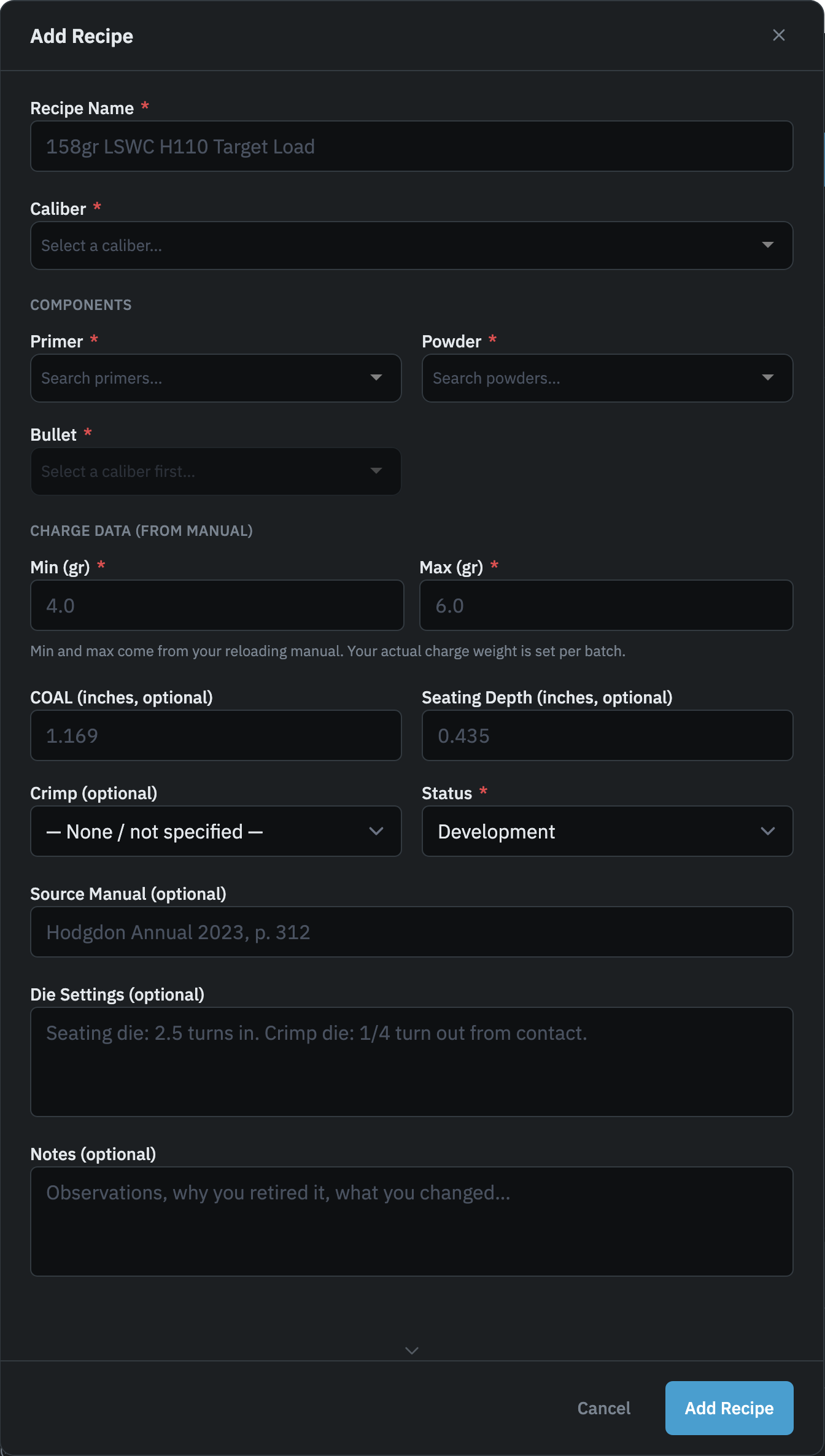
Go to Recipes in the nav and tap Add Recipe. The form covers all fields in a single modal.
Name and caliber
Give the recipe a descriptive name. Most reloaders include the bullet weight, type, and powder so the list stays readable at a glance. The placeholder in the form ("158gr LSWC H110 Target Load") shows the pattern. The caliber selection is required and filters the bullet list to matching projectiles only.
Components
Select a primer, powder, and bullet from your catalog. The bullet picker is disabled until you choose a caliber; once selected, it shows bullets whose primary caliber matches, as well as any bullets from other calibers that have been assigned as compatible with it. Primers and powders are not filtered by caliber, so your full catalog is available for both.
If a bullet you use isn't in the list, you can add it inline without leaving the form. Expand "Add a bullet for this caliber," enter the weight, type, and optional brand, and tap Add and Select. The bullet is added to your catalog and immediately selected for the recipe.
Charge weight range
Enter the minimum and maximum charge weights from your reloading manual in grains. These become the reference range displayed when you log a batch: if you enter a charge outside this range, the app shows a warning. The batch still saves. Reloaders intentionally load outside published ranges, so the range check is advisory only.
Your actual charge weight is recorded per batch, not here.
COAL and seating depth
Both fields are optional and accept decimal inches (for example, 1.169). The app stores them as thousandths of an inch internally, so you don't need to do any conversion. Enter the value from your calipers or manual and the app handles it.
The COAL entered here is your manual target. When you log a batch, you can record the actual COAL you seated to on that specific run.
Crimp
Optional. Choose taper crimp, roll crimp, or none. Leave it unset if you haven't settled on a crimp type yet.
Status
Every recipe has a status that shows where it sits in your development process:
- Development: the default. You're still working up this load and haven't committed to it.
- Tested: the load has been range-tested and you're satisfied with it. Use this when a recipe has moved from experimentation to regular production.
- Retired: you no longer load this recipe. The recipe and all linked batches are preserved in your history, but it won't clutter your active list.
Status can be changed at any time. The recipe list can be filtered by status.
Source manual, die settings, and notes
The source manual field is a free-text line for recording where the charge data came from, for example "Hodgdon Annual 2023, p. 312". It has no effect on app behavior; it's a reference for your own records.
Die settings is a separate notes field for your die configuration: seating die depth, crimp die adjustment, and similar mechanical settings you don't want to re-derive the next time you set up the press.
Notes is a general-purpose field for anything else: observations, preliminary velocity results, or a reason why you retired the recipe.